https://ift.tt/RjTOvFz Search online for "best AI courses" and you'll get two very different kinds of results. Some lists are...
Search online for "best AI courses" and you'll get two very different kinds of results. Some lists are for people who want to learn to use AI tools. Others are for people who want to learn to build AI systems from scratch. Choosing the wrong type can cost you months.
This guide compares 10 of the best AI courses across both goals. We've organized them from beginner-friendly tools courses to engineering-depth programs, with cost, time commitment, learning format, and the audience each one serves. By the end, you'll know which course fits your situation and where to start this week.
Best AI Courses: Top Picks by Goal
Want the short version? Here are the strongest picks for the most common goals:
- Best free way to start using AI: Dataquest AI Chatbots
- Best beginner course for AI literacy: DeepLearning.AI AI for Everyone
- Best free deep dive (no coding required): Helsinki Elements of AI
- Best for AI engineering: Dataquest AI Engineer in Python
- Best free LLM hands-on course: Hugging Face LLM Course
- Best free production and MLOps course: MLOps Zoomcamp
- Best project-based LLM build: Master LLM Engineering & AI Agents (Udemy)
AI Courses Compared at a Glance
| Course | Track | Cost | Time | Format | Best For |
|---|---|---|---|---|---|
| Dataquest AI Chatbots | Using AI | Free | ~3 hr | Interactive browser | Curious beginners with no budget |
| AI for Everyone (DeepLearning.AI) | Using AI | Free audit / \$49 cert | ~10 hr | Video + quiz | Career-curious newcomers |
| Helsinki Elements of AI | Using AI | Free (cert included) | ~6 weeks | Text + exercises | Self-directed learners on a budget |
| Google AI Essentials | Using AI | Free + \$49 cert | ~6 hr | Video + project | Busy professionals |
| Dataquest AI Engineer in Python | Building AI | Free intro / \$49 mo | 10 mo at 5 hr/wk | Interactive browser | Aspiring AI engineers |
| Generative AI with LLMs (DeepLearning.AI + AWS) | Building AI | Free audit / \$49 mo cert | ~16 hr | Video + labs | Developers new to LLMs |
| Hugging Face LLM Course | Building AI | Free | ~30-50 hr | Text + code | Self-taught Python developers |
| Full Stack Deep Learning LLM Bootcamp | Building AI | Free | ~12 hr | Video lectures | Engineers shipping LLM apps |
| Master LLM Engineering & 14 Projects (Udemy) | Building AI | \$15-60 (Udemy) | 50+ hr | Video + projects | Job-seeking Python developers |
| MLOps Zoomcamp (DataTalksClub) | Building AI | Free | ~10 weeks | Cohort or self-paced | ML engineers going into production |
For the full breakdown of cost, learning format, and what each course delivers, keep reading.
Two Tracks: Using AI vs Building AI
Before we start talking about individual courses, it helps to know which track fits your situation:
- Using AI is about getting better results from existing tools: prompt design, workflow automation, picking the right model for a task.
- Building AI is about engineering the systems underneath: writing Python code that calls LLM APIs, designing RAG pipelines, fine-tuning models, deploying production applications.
The skills don't transfer much between the two. One path takes hours to weeks of hands-on practice. The other takes months of structured technical learning. The diagram below shows what each track involves day to day.
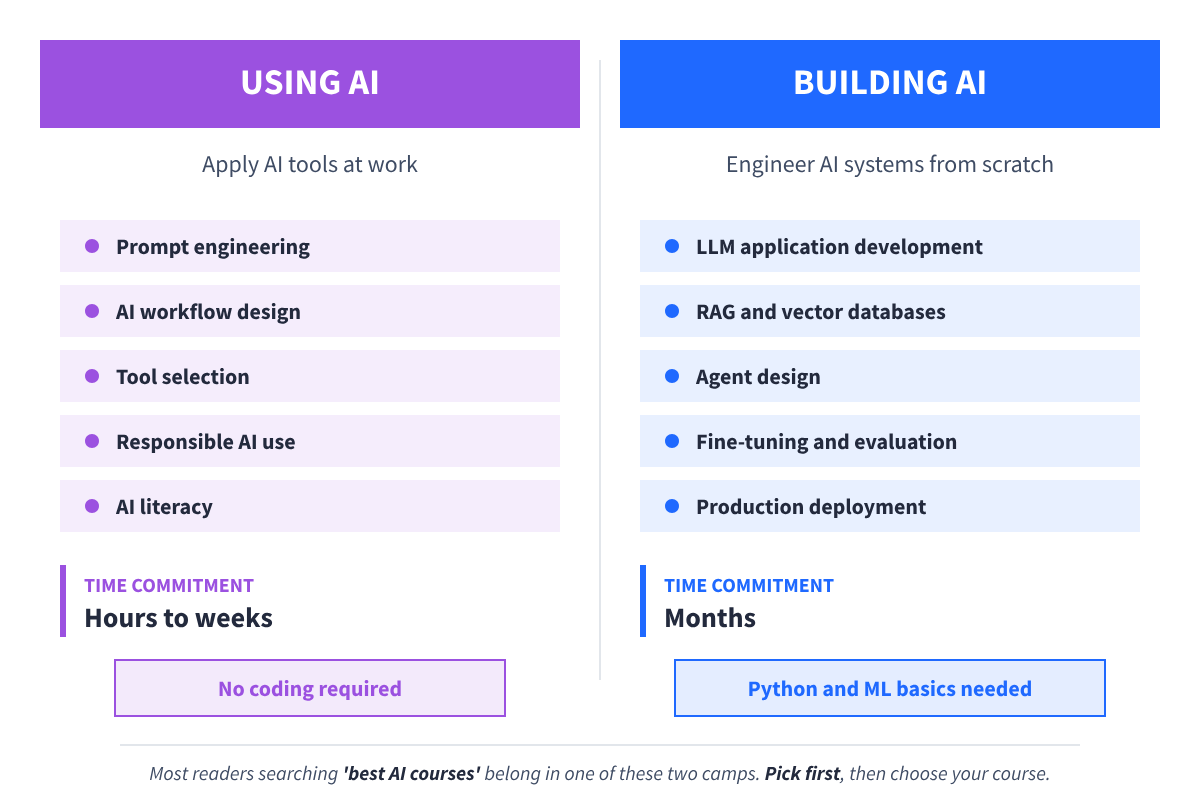
Each section that follows is ordered from beginner-friendly to deeper commitment, so you can start wherever your current skills allow.
Best AI Courses for Learning to Use AI
This category serves readers who want to apply AI in their existing work. No coding required, time commitments are shorter, and the skills transfer directly to daily tasks like writing, research, planning, and decision-making. If you've ever asked a chatbot something and stared at the screen wondering whether the response is helpful or hallucinated, this section is for you.
1. Dataquest AI Chatbots

- Cost: Free. All lessons are unpaywalled, so no credit card is required.
- Time to Complete: ~3 hours, self-paced.
- Prerequisites: None.
- What You'll Learn:
- Chatbot fundamentals and how LLMs power them
- Hands-on prompt writing through guided practice with Dataquest's chatbot, Chandra
- Understanding what chatbots can and can't do
- How to test chatbot limitations and improve your inputs
- When to use chatbots versus other tools
- Industry Recognition: 4.79/5 on CourseReport. Used as a Dataquest gateway course for hundreds of thousands of learners.
- Best For: Anyone who wants a free, low-commitment way to start working with AI chatbots without coding.
Why it works: Dataquest's AI Chatbots course is built around hands-on practice with Chandra, an in-browser chatbot. You don't just read about prompting. You write prompts, see how Chandra responds, and adjust your approach in the same window where you're learning. That feedback loop is what makes the skills stick.
The course is intentionally short and focused. You learn the basics of AI, machine learning, deep learning, NLP, and chatbots, but the practical side is the main point. By the end, chatbots feel less like a guessing game and more like a tool you can control.
Worth knowing: This is a starter course, not career preparation. If you want to build production chatbot systems or work with LLM APIs at scale, you'll outgrow this quickly. The natural next step is the Generative AI Fundamentals in Python skill path, then the full AI Engineer in Python career path covered later in this guide.
2. AI for Everyone (DeepLearning.AI, on Coursera)
- Cost: Free to audit / $49 for Coursera certificate
- Time to Complete: ~10 hours across 4 weeks
- Prerequisites: None
- What You'll Learn:
- What AI can and can't do
- How machine learning and data science differ
- How to build AI projects within an organization
- AI's broader impact on society
- Common pitfalls when bringing AI into business
- Industry Recognition: 2.5M+ enrollments and 50,000+ positive reviews. Taught by Andrew Ng, founder of DeepLearning.AI and co-founder of Coursera.
- Best For: Absolute beginners who want a foundational understanding from a recognized authority in the field.
Why it works: Andrew Ng has a rare ability to make AI concepts feel approachable without dumbing them down. His AI for Everyone course covers what AI is, what it can and can't do, and how it fits into business and society. The breadth is the point: you finish with a clear conceptual map of the field, which makes everything you learn afterward easier to place.
The course is available in 31 languages, and the video format works well for learners who prefer instruction over self-directed reading.
Worth knowing: This is a conceptual course, not a hands-on one. You'll come away understanding AI as a domain but with limited ability to apply specific tools at work. Pair it with one of the more applied options in this section (like Google AI Essentials) if you want practical skills alongside the foundational framing.
3. Helsinki Elements of AI

- Cost: Free, including the certificate
- Time to Complete: ~6 weeks, self-paced
- Prerequisites: None
- What You'll Learn:
- AI problem-solving and how AI agents work
- Real-world applications across industries
- Machine learning basics and neural networks
- Practical exercises that apply each concept
- Implications of AI for society and ethics
- Industry Recognition: 1.8M+ learners across 26 languages. Built by the University of Helsinki in partnership with MinnaLearn, and used as a for-credit course at Finnish universities.
- Best For: Self-directed learners who want a free, university-grade introduction without video.
Why it works: Helsinki's Elements of AI course proves that free university content can compete with paid alternatives. The curriculum is structured across six modules covering problem-solving, real-world AI, machine learning, neural networks, and the societal implications of the technology. Practical exercises are scattered throughout, so you're applying ideas rather than just absorbing them.
The interface is clean and easy to navigate, which keeps the text-heavy format from feeling like it’s too much. The certificate is free, which is rare for university-affiliated courses.
Worth knowing: This is a text-based course with no video accompaniment, which can frustrate visual learners. The depth is impressive for free content, but the time commitment is real. If ethics and AI's societal implications interest you specifically, the University of Helsinki also runs a separate Ethics of AI course worth checking out.
4. Google AI Essentials

- Cost: Free to take + $49 for Google certificate (on Coursera)
- Time to Complete: ~6 hours
- Prerequisites: None
- What You'll Learn:
- Practical AI tool use for daily work tasks
- Prompt design for ChatGPT, Gemini, and other LLMs
- AI ethics and responsible workplace use
- Content creation, idea generation, and analysis workflows
- How to evaluate AI outputs critically
- Industry Recognition: Google-credentialed, designed to address AI skill gaps that enterprise leaders flag as a barrier to AI adoption.
- Best For: Working professionals who want immediate, applied AI skills they can use at their job this week.
Why it works: Google AI Essentials is short, focused, and built around workplace scenarios rather than theoretical AI concepts. You finish with concrete techniques you can apply to writing, research, and analysis tasks the same day. The Google credential carries weight in industries that value structured upskilling signals.
The course content reflects current AI tools rather than older patterns, which matters more for "Using AI" content than for engineering courses since prompt design and tool capabilities shift quickly.
Worth knowing: This course is designed for individual contributors. If you're tasked with leading AI transformation at your organization or developing AI strategy for a team, Google's Generative AI Leader Path is a better fit, though it requires more time and a higher commitment.
Best AI Courses for Building AI
This category is for learners who want to engineer AI systems rather than use them. Expect Python prerequisites, longer time commitments, and substantially more depth. The payoff is the ability to build production AI applications, work with LLM APIs at scale, ship agents, design RAG systems, and own AI systems end-to-end.
5. Dataquest AI Engineer in Python
- Cost: Free intro lessons (no credit card required). Full path access requires a paid plan: $49/month
- Time to Complete: 10 months at 5 hours/week, self-paced
- Prerequisites: None for the path overall (it starts with Python fundamentals).
- What You'll Learn:
- Python programming and developer tooling (command line, Git, virtual environments)
- Working with LLMs through APIs, prompt engineering, and tool use
- Building AI applications with FastAPI and deploying with Docker
- Data analysis with pandas, NumPy, and matplotlib
- Machine learning with scikit-learn and deep learning with PyTorch
- Embeddings, vector databases (ChromaDB, pgvector, Qdrant, Pinecone), and semantic search
- Designing and building retrieval-augmented generation (RAG) systems
- 30 courses and 20 guided projects, including building a multi-provider LLM gateway and deploying a containerized AI service
- Industry Recognition: 4.79/5 on CourseReport. 157,367 learners enrolled. Dataquest has been independently reviewed by LearnDataSci as a strong fit for hands-on, text-based interactive learning.
- Best For: Developers and data professionals ready to commit to becoming AI engineers.
Why it works: Dataquest's AI Engineer in Python career path is built around a project-first methodology. Every concept ties to a real build, and you write code in the same browser window where you're learning. The path takes you from Python fundamentals through LLM application development, vector databases, and RAG systems, with hands-on guided projects that build a portfolio along the way.
The depth-first design teaches fewer topics thoroughly instead of skimming many. You learn what an embedding is by generating embeddings and visualizing them. You learn how RAG works by building a complete RAG pipeline. You learn deployment by deploying a containerized FastAPI app to the cloud. That kind of applied learning is what makes the skills stick after the path ends.
Worth knowing: This is a 10-month commitment. If you want a shorter path that still teaches you to build with generative AI in Python, our Generative AI Fundamentals in Python skill path is the middle step between the AI Chatbots course and the full career path. If you're not sure whether Dataquest's format works for you, the AI Chatbots course is free and gives you a feel for the platform in about 3 hours.
6. Generative AI with Large Language Models (DeepLearning.AI + AWS, on Coursera)
- Cost: Free to audit / $49/month for Coursera Plus and certificate
- Time to Complete: ~16 hours across 3 weeks
- Prerequisites: Python familiarity and basic machine learning are helpful
- What You'll Learn:
- The LLM lifecycle from data through training to deployment
- Prompt engineering fundamentals and advanced techniques
- Fine-tuning, RLHF, and model customization
- Model evaluation and benchmarking
- Responsible AI and deployment considerations
- Industry Recognition: Co-developed by DeepLearning.AI and AWS, taught by working AI engineers. Strong reviews across Coursera and developer communities.
- Best For: Developers who want a structured conceptual overview of how LLMs work end to end.
Why it works: The Generative AI with Large Language Models course gives you a clean mental model of the LLM lifecycle, from data preparation through fine-tuning to deployment. The lifecycle framing is the standout feature: instead of jumping straight into prompts or APIs, you learn how each stage feeds the next, which makes you a better engineer at every level.
The audit option lets you preview before paying, and the labs reinforce the concepts with hands-on exercises rather than just watching lectures.
Worth knowing: This course is more about mental models than day-two production operations. If you want to learn cost management, drift detection, or evaluation pipelines in depth, pair it with Full Stack Deep Learning's LLM Bootcamp.
7. Hugging Face LLM Course

- Cost: Free
- Time to Complete: ~30-50 hours, self-paced
- Prerequisites: Python basics required
- What You'll Learn:
- Transformer architecture in practice
- Working with the Hugging Face Hub and ecosystem
- Tokenization and embeddings
- Fine-tuning open-source models
- Building NLP applications end-to-end
- Deployment basics for transformer models
- Industry Recognition: Hugging Face is the de facto open-source AI hub, and the course is widely referenced in community discussions and engineer onboarding plans.
- Best For: Developers who learn by reading documentation and running real code with industry-standard tools.
Why it works: Hugging Face's LLM course is hands-on, code-first, and assumes you want to build rather than just understand. Their ecosystem (transformers library, datasets, model hub) is so widely used in industry that learning it well is a transferable skill on its own.
Their active community forum is a real asset. When you get stuck, working engineers and Hugging Face team members regularly answer questions.
Worth knowing: The self-directed format means motivation matters. There are no deadlines, no instructors checking in, and no required pace. If you've completed similar self-paced courses before, you'll thrive. If you need external accountability to finish things, pair this with a friend who's also working through it.
8. Full Stack Deep Learning: LLM Bootcamp
- Cost: Free (recorded sessions)
- Time to Complete: ~12 hours
- Prerequisites: ML fundamentals and Python
- What You'll Learn:
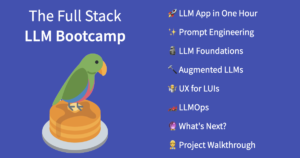
- How to design LLM applications that work in production
- System design tradeoffs for AI-powered apps
- Evaluation and monitoring patterns
- Cost management at scale
- Prompt engineering for production reliability
- Common production failure modes and how to handle them
- Industry Recognition: Taught by practitioners who've shipped LLM systems at production scale. Highly regarded in the AI engineering community.
- Best For: Developers who want the practitioner perspective on building LLM apps that survive contact with real users.
Why it works: Full Stack Deep Learning's bootcamp treats production failure as normal rather than embarrassing. The content covers what most courses skip: what happens when your costs spike unexpectedly, what to do when prompts start drifting, how to monitor for behavior changes after model updates, and how to design systems that degrade gracefully. It's the closest thing to a senior engineer walking you through their hard-won lessons.
The free format and short time commitment make it easy to fit alongside other learning.
Worth knowing: This isn't a tutorial-style course. It's a reality check with receipts, which works best for readers who already have some LLM building experience. Beginners can still get value from it, but you'll appreciate the lessons more after you've shipped (and broken) something yourself.
9. Master LLM Engineering and AI Agents: 14 Projects (Udemy)

- Cost: $15-60 on Udemy (frequently on sale; lifetime access)
- Time to Complete: 50+ hours
- Prerequisites: Python comfort required
- What You'll Learn:
- 14 complete projects covering modern LLM engineering
- RAG pipelines from scratch and with frameworks
- Agent design with tool use and multi-step reasoning
- Fine-tuning workflows for domain-specific tasks
- Production deployment and cost management
- Modern agent frameworks current as of 2025-2026
- Expiration: Never (Udemy lifetime access)
- Industry Recognition: Strong reviews on Udemy. The project portfolio is interview-ready.
- Best For: Developers who learn by doing and want concrete portfolio work at the end of the course.
Why it works: Theory is helpful. 14 projects are better. The Master LLM Engineering and AI Agents course is built around aggressively practical building, and by the time you finish, you have a portfolio of working LLM systems to show in interviews. The content is current with 2025-2026 tooling, which is rare for Udemy courses, where instructors don't always update aggressively.
The Udemy lifetime access model is genuinely useful for AI content because you can revisit lessons as the field evolves.
Worth knowing: Heavy on breadth, lighter on theoretical depth. You'll touch on many topics at a working level rather than going deep on any single area. Some sections may need community-contributed workarounds as the specific tools and library versions evolve. Best paired with a course that covers foundational concepts in more depth, like Generative AI with LLMs above.
10. MLOps Zoomcamp (DataTalksClub)
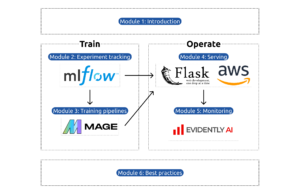
- Cost: Free
- Time to Complete: ~10 weeks (cohort) or self-paced
- Prerequisites: Python and comfort with the command line
- What You'll Learn:
- Deployment patterns for ML and AI systems
- Monitoring and observability
- Testing strategies for ML code
- CI/CD for model pipelines
- Experiment tracking with MLflow
- Model registries and version control
- The operational skills AI engineers need to keep systems running
- Industry Recognition: Active community of 50,000+ learners across cohorts. Regularly cited as the missing piece in most AI engineering education.
- Best For: AI engineers who want the operational backbone that LLM-specific courses tend to skip.
Why it works: Most AI courses teach you how to start a project. MLOps Zoomcamp teaches you how to keep it alive. The curriculum covers deployment, monitoring, testing, CI/CD, and the operational practices that separate a one-off demo from a production system. It's the kind of unsexy work that determines whether your AI application delivers value over time, and the cohort format with peer reviews keeps you accountable.
The Slack community is one of the strongest in open AI education, with active discussions, project showcases, and former students who stay involved to help newcomers.
Worth knowing: This isn't LLM-specific. The course teaches general ML operations, which transfer directly to AI engineering but cover broader ground than just generative AI. If your goal is purely LLM application development, the deployment and monitoring chapters of an LLM-focused course may suffice. If you want a complete operational foundation, this course is in a class of its own.
How to Tell If an AI Course Is Still Current
Every course in this guide passed a recency check before making the cut, so you don't need to worry about whether the content is still relevant. But if you're evaluating courses outside this list (or revisiting this guide six months from now), here's the framework we use.
AI tooling moves faster than any other technical topic. A course recorded in 2023 may already teach deprecated patterns, miss agent frameworks entirely, or reference model versions that no longer exist. This makes course recency a unique evaluation criterion for AI content that doesn't apply nearly as much to, say, Python fundamentals.
Here's what to check before enrolling in any AI course:
- When was the course last updated? Most platforms display this, though sometimes you need to look at the course description carefully. A course last updated in 2024 covering "modern AI" should raise a flag in 2026.
- Does the curriculum cover agents, MCP (Model Context Protocol), or modern RAG patterns? These are 2024-2025 developments that any current AI engineering course should at least mention. Their absence is a signal that the content is dated.
- Which model versions does the course reference? If everything is GPT-3.5 with no mention of newer model families, the content predates significant capability shifts.
- What do recent comments and reviews say? Sort reviews by recent and look for "outdated," "deprecated," or "doesn't work anymore" language. Active learners flag these issues quickly.
- Does the platform have an update policy? Some platforms (like Hugging Face's course) update aggressively. Others (some Udemy courses) update only when the instructor chooses to.
One caveat: this doesn't apply to foundational content. Andrew Ng's AI for Everyone is from 2017 and still useful for the same conceptual reasons it was useful then. The recency check matters most for hands-on engineering courses where tooling specifics matter.
When You Don't Need an AI Course
A course isn't always the right move. You can probably skip a paid course if:
- You're already shipping AI features at work. The OpenAI Cookbook, Anthropic docs, and Hugging Face tutorials will move faster than any course for your specific use case.
- You have a narrow specific goal. Need to fine-tune one model on your data? Need to build one chatbot for one team? A targeted tutorial beats a 50-hour course every time.
- You learn better from primary sources. Official documentation and GitHub examples often teach faster than recorded lectures, especially for tools that update frequently.
- You're already in tutorial hell. If you've started three AI courses and finished none, the fourth course won't fix the pattern. Building something (anything) will.
- You want free, project-based practice without a course commitment. Dataquest has free projects and blog content covering key AI concepts in plain language that you can work through at your own pace.
Picking Your AI Course (and Where to Start This Week)
If you're still torn after reading all this, that's fair. Choice paralysis is the most common reason people researching AI courses never start one. The opportunity cost of comparing options for another month is higher than the cost of picking the "wrong" course.
Here's a quick decision shortcut based on where you are:
- You want to use AI tools at work without coding: Start with Dataquest AI Chatbots. Free, ~3 hours, hands-on practice immediately.
- You want a recognized intro credential from a respected name: Choose DeepLearning.AI's AI for Everyone. Andrew Ng's teaching is approachable, and his certificate carries some weight.
- You're ready to commit to becoming an AI engineer: The Dataquest AI Engineer in Python career path takes you from Python fundamentals through production AI systems in about 10 months of part-time study.
- You want generative AI in Python without the full career commitment: Try our Generative AI Fundamentals in Python skill path. It sits between the AI Chatbots course and the full career path in terms of commitment and depth.
- You want depth in one specific area (agents, RAG, MLOps, production thinking): Pick the matching free option from the Building AI section.
Pick one this week. Block study time on your calendar. Finish it before enrolling in another. The biggest predictor of whether you'll learn AI isn't which course you pick. It's whether you finish what you start.
Frequently Asked Questions
Should I learn AI or machine learning first?
It depends on what you want to build. If your goal is to use existing AI models through APIs (which is what most working AI engineers do today), you can start with prompt engineering and LLM application development without a deep ML background. You'll need ML basics eventually, but you don't need to start there.
If your goal is to train models from scratch, fine-tune for novel use cases, or work in research, machine learning fundamentals come first. The two paths converge eventually, but the entry point depends on whether you want to build on top of pre-trained models or create new ones. For most AI engineering roles in 2026, the API-first path gets you shipping faster.
Are AI courses worth it in 2026 when AI is changing so fast?
Yes, with one caveat: pick courses that update their content. The fundamentals of prompt engineering, system design, evaluation, and production deployment are durable even as specific tools shift. What changes month to month is the model versions and library APIs, which any decent course flags as moving targets rather than fixed facts.
The best AI courses teach you how to think about AI systems, not just how to use today's tools. See our section on how to evaluate course recency for the specific signals to look for. Courses that pass that test are worth it. Courses that don't will leave you with knowledge that's already aging on day one.
Can I learn AI without programming experience?
Yes, for the "Using AI" track. Every course in the first section of this guide is designed for learners with zero coding background. You'll learn how to write effective prompts, evaluate AI outputs, design workflows, and bring AI into your daily work without writing a line of code.
For the "Building AI" track, Python is required. The good news is that learning enough Python to start AI engineering takes 2-3 months at 5-10 hours per week, not years. If you're starting from zero, our Learn Python skill path is designed to get you ready for AI work specifically.
What's the difference between an AI engineer and a machine learning engineer?
AI engineers typically build applications on top of pre-trained models (like LLMs from OpenAI or Anthropic, or open-source models from Hugging Face) using APIs and frameworks. The daily work involves prompt engineering, RAG system design, agent development, and integrating AI capabilities into existing applications.
Machine learning engineers typically train and deploy models from data, often in narrower domains (recommendation systems, fraud detection, image classification). The daily work involves data pipelines, feature engineering, model training, and MLOps.
The two roles overlap, and many people do both. But the skill emphasis differs. If you want to ship LLM applications and agents, focus on AI engineering. If you want to train models for specific predictive tasks, focus on ML engineering. Our AI Engineer in Python career path covers the AI engineering side specifically, with enough ML foundations to do the work well.
Do AI certificates matter to employers?
For entry-level roles, certificates from recognized providers (Google, AWS, Microsoft, university partners, DeepLearning.AI) carry some weight. Certificates from unknown providers carry very little.
Hiring managers prioritize portfolio over certificates almost universally. A GitHub profile with 3-5 thoughtful AI projects (a working RAG system, an agent that does something useful, a fine-tuned model with documented evaluation) beats a stack of course certificates with no demonstrated work. The exception is when a job posting specifically lists a certification, which is more common for cloud or platform-specific credentials than for general AI.
Build the portfolio first. The certificate is a nice-to-have on top, not a substitute. For credential-focused guidance specifically, see our guide to the best AI certifications.
How long does it take to get job-ready as an AI engineer?
Realistic timeline: 6 to 12 months at 10-15 hours per week of focused study, including portfolio project work. Faster if you already program in Python and have ML basics. Slower if you're starting from zero with no programming experience.
Job-ready means more than completing a course. It means a portfolio of 3-5 AI projects on GitHub, comfort with the modern AI stack (LLM APIs, vector databases, RAG, basic deployment), and the ability to debug unfamiliar AI code without panic. Apply for roles before you feel fully ready. The market teaches you what skills matter most, and waiting for "ready" often means waiting too long.
Are free AI courses as good as paid ones?
For self-directed learners, the strongest free options compete directly with paid programs. Helsinki Elements of AI, Hugging Face LLM Course, Full Stack Deep Learning, and MLOps Zoomcamp are genuinely excellent. The content rivals what you'd pay for at most platforms.
What paid programs offer is structure, accountability, and a curated path. If you've completed self-directed courses before without prompting, free is probably enough. If you've started and stopped multiple courses, the cost of a paid program is small compared to another six months of false starts. The right answer depends on your completion track record, not the underlying course quality.
Should I take one AI course or several?
One focused course completed thoroughly beats three half-finished comprehensive ones. After your first foundation course, additional courses serve specialization (agents, RAG, MLOps) rather than redundant overview content.
The most common failure pattern is collecting AI courses without finishing any of them. Three half-completed Coursera specializations plus one half-completed Udemy course equals zero portfolio projects and zero consolidation. The pattern is sometimes called "tutorial hell," and the way out is finishing what you start, even if the course turns out to be imperfect. Imperfect and finished beats perfect and abandoned every time.
from Dataquest https://ift.tt/g6ruChp
via RiYo Analytics


No comments