https://ift.tt/x7SihjH The fastest way to get better at Python is to write Python. This page has 136 free practice exercises (and 298 premi...
The fastest way to get better at Python is to write Python. This page has 136 free practice exercises (and 298 premium) across 33 exercise sets you can solve in your browser, organized by topic and difficulty. You'll also find a short guide on how to practice effectively, the best external platforms for coding challenges, and starter projects for when you're ready to build something real. Pick your level and start writing code.
Table of Contents
- Python Practice Exercises by Topic
- How to Practice Python Effectively
- Python Practice Projects
- Python Courses That Include Practice
- Python Practice Plan
- FAQs
Python Practice Exercises by Topic
Dataquest's exercise library has 136 free practice problems plus 298 premium exercises across 33 sets. Each exercise gives you a problem, a code editor, and instant feedback when you run your solution. No setup required.
Filter by topic to find what you need. Free exercises are listed first in every section.
How to Practice Python Effectively
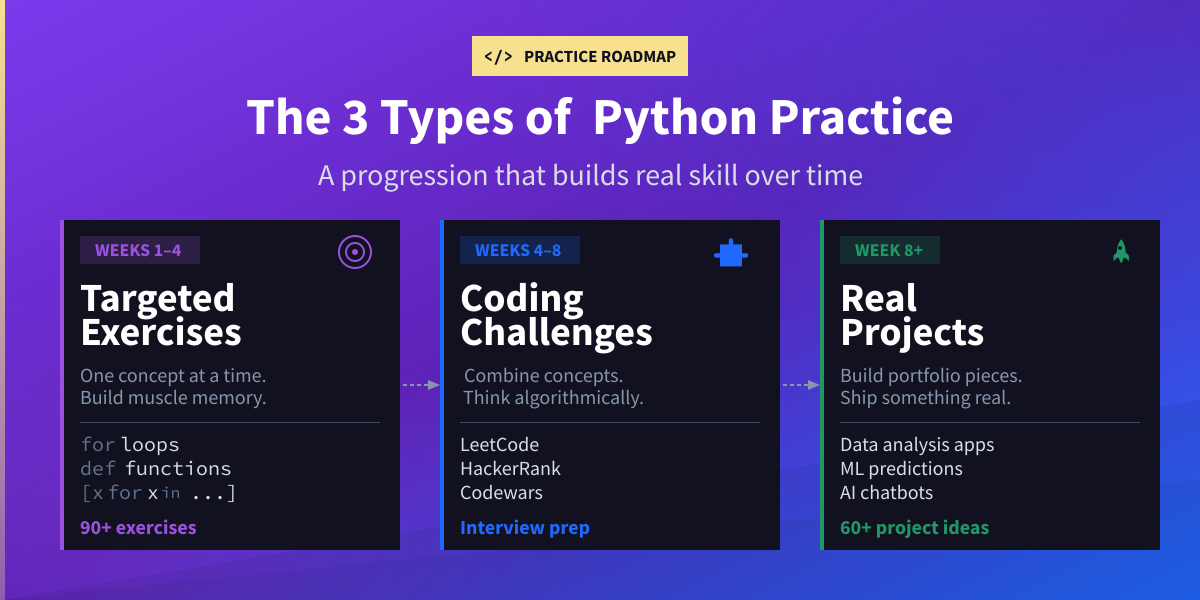
Not all practice is equal. Copying code from a tutorial teaches you very little. Effective practice sits in the sweet spot between too easy and too hard, and it follows a progression.
Three Types of Practice
Targeted exercises drill one concept at a time — loops, functions, list comprehensions — until the syntax becomes automatic. This is where beginners should start. Dataquest's practice page is built for this kind of focused repetition.
Coding challenges test your ability to combine concepts and solve problems under constraints. Platforms like LeetCode and HackerRank are built for this. These are especially valuable for interview prep.
Projects tie everything together. You pick a problem, design a solution, and build something that works. Projects teach skills that isolated exercises can't: reading documentation, structuring code, and handling messy data. Our Python projects guide has 60+ ideas by skill level.
Python Practice Projects
At some point, exercises aren't enough. You need to build something real. Projects teach you skills that isolated exercises can't: reading documentation, handling unexpected data, structuring code for maintainability, and actually finishing something.
The transition point is usually around week 6-8 of consistent practice. If you can write functions, work with lists and dictionaries, and handle basic file I/O, you're ready for a beginner project.
Here are four good starter projects, all available as free guided walkthroughs:
- Interactive Word Game — Build a word-guessing game using loops, conditionals, and string operations. Great first project because it's fun and the logic is straightforward.
- App Market Analysis — Analyze real data from the App Store and Google Play to find which types of apps attract the most users. Your first real data analysis project.
- Predicting Heart Disease — Build a simple prediction model using health data from the World Health Organization. A meaningful introduction to machine learning.
- Dynamic AI Chatbot — Create a chatbot that tracks conversation history and switches personas. A great bridge into AI and API work.
For the full list of 60+ project ideas organized by skill level, see our Python projects for beginners guide.
Python Courses That Include Practice
If you prefer structured learning where exercises are built into the lessons, these courses combine instruction with hands-on coding. You read a short lesson, solve a problem in your browser, and move on. Each course includes at least one free lesson.
Python Fundamentals: Python Syntax & Variables | For Loops & Dictionaries | Functions & Jupyter Notebook
Data Analysis & Visualization: Pandas & NumPy Fundamentals | Data Visualization Fundamentals | Storytelling with Data Visualization
Data Cleaning: Data Cleaning & Analysis | Advanced Data Cleaning | Data Cleaning Guided Project
Machine Learning: Intro to Supervised Learning | Linear Regression | Decision Trees & Random Forests
AI & Deep Learning: APIs for AI — LLM Chatbots |Deep Learning with TensorFlow
Probability & Statistics: Intro to Statistics | Probability Basics | Hypothesis Testing
For the complete list, visit Dataquest's Python course catalog.
A Simple Practice Plan That Works
You don't need to practice for hours. Consistency matters more than marathon sessions. Here's a realistic plan:
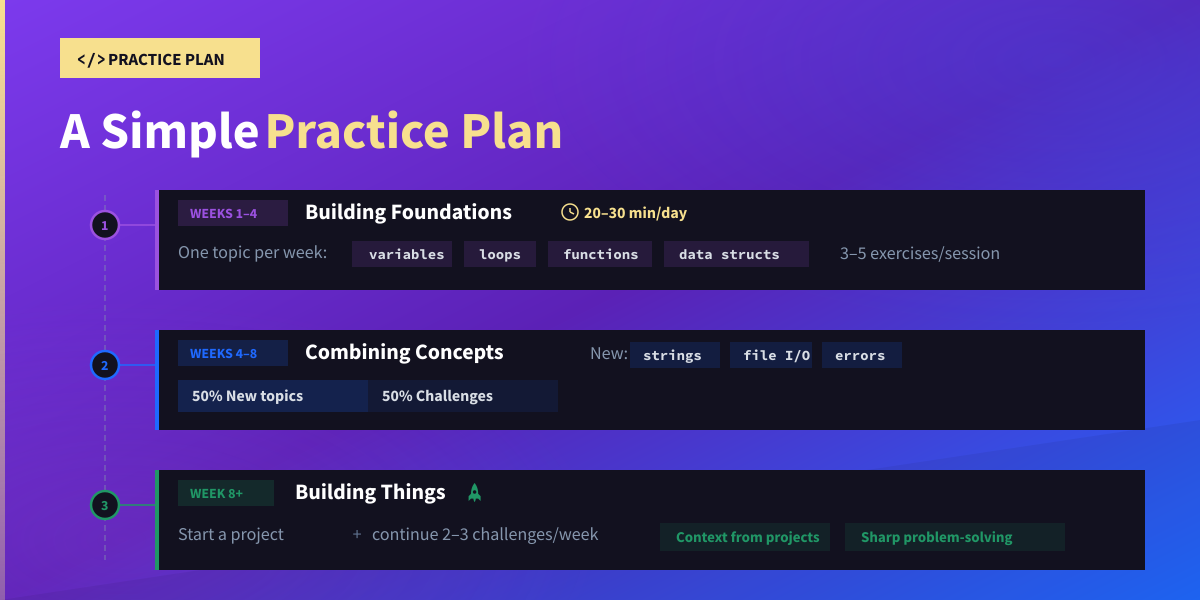
Weeks 1-4 (Building foundations): Spend 20-30 minutes per day on targeted exercises. Focus on one topic per week: variables and data types in week one, loops and conditionals in week two, functions in week three, data structures (lists, dictionaries, sets) in week four. Complete 3-5 exercises per session.
Weeks 4-8 (Combining concepts): Mix targeted exercises with coding challenges. Spend half your practice time on new topics (string manipulation, file I/O, error handling) and half on challenge problems that require combining skills you've already practiced.
Weeks 8+ (Building things): Start a small project while continuing 2-3 challenge problems per week. The project gives you context for why the fundamentals matter. The challenges keep your problem-solving sharp.
A note about AI tools: GitHub Copilot, ChatGPT, and Claude can be genuinely useful alongside practice, not as a replacement for it. Use AI to explain concepts you're stuck on, review code you've already written, or generate new practice problems. Don't use it to write solutions for you. If you skip the struggle of solving problems yourself, you skip the learning.
FAQs
Where can I practice Python programming online?
Dataquest has 130+ free interactive exercises with in-browser coding, organized by topic. HackerRank covers Python across all difficulty levels. LeetCode is the standard for interview prep. Exercism offers free exercises with optional mentor feedback. W3Schools has simple fill-in-the-blank exercises for absolute beginners.
How should I practice Python for job interviews?
Make sure your fundamentals are solid first — especially functions, lists, dictionaries, and string manipulation. Then move to LeetCode for algorithm-style problems. Start with "Easy" and aim to solve them in under 15 minutes before moving to "Medium." For data roles, prioritize pandas alongside Python. Practice explaining your thought process out loud while you code.
How many Python exercises should I do per day?
Three to five focused exercises is more effective than twenty rushed ones. If an exercise takes more than 20 minutes, review the underlying concept before continuing. Consistency matters most — 30 minutes daily beats a 10-hour weekend sprint followed by a week off.
Can I practice Python on mobile?
Apps like Mimo work for reviewing concepts on the go. But mobile practice shouldn't be your primary method for building professional skills. Real development happens with a proper code editor and terminal access. Dataquest lets you write code in your browser without installing anything, which works well on tablets.
Should I still practice Python now that AI can write code?
Yes. AI tools generate code, but they can't replace the understanding that comes from writing it yourself. AI-generated code often contains subtle bugs or inefficient patterns. If you can't read, evaluate, and debug code, you can't use AI effectively.
Think of it this way: AI is a powerful calculator, but you still need to understand math to know when it gives a wrong answer. The most effective approach is to write your solution first, then use AI to review or improve it.
Python itself remains central to the AI field — TensorFlow, PyTorch, and most ML workflows run on Python. Understanding the language makes you a better user of AI tools, not a redundant one.
from Dataquest https://ift.tt/DKBoT68
via RiYo Analytics


No comments