https://ift.tt/F06oHa1 If normalization in SQL has come up in your coursework, a job interview, or a code review, and the explanation hasn...
If normalization in SQL has come up in your coursework, a job interview, or a code review, and the explanation hasn't quite clicked, you're in good company. This is one of those concepts that sounds simple in a definition but genuinely trips people up when they try to apply it.
Picture a customer orders table where the same supplier name appears under three slightly different spellings, or where changing a customer's email means hunting down 200 rows. These aren't edge cases — they're the everyday costs of unnormalized data, and they affect both the developers writing to the database and the analysts querying it.
Normalization matters whether you're designing a database from scratch or querying an existing one. It gives your data a structure that's easier to maintain, more reliable to query, and less likely to produce silent errors in your analysis.
In this guide, you'll work through 1NF, 2NF, 3NF, and BCNF using one consistent Orders dataset for most of the journey. You'll see the same Orders table transform at every stage, with SQL queries that show what breaks before normalization and what becomes possible after. At Dataquest, hands-on practice with real data is how we help learners build skills that actually transfer to the job. If you want to go deeper after this, our SQL Fundamentals course is a practical next step.
Table of Contents
- What Is Normalization in SQL?
- The Dataset We'll Use
- First Normal Form (1NF)
- Second Normal Form (2NF)
- Third Normal Form (3NF)
- The Normalized Schema at a Glance
- Boyce-Codd Normal Form (BCNF)
- Should You Always Normalize?
- FAQ
What Is Normalization in SQL?
Normalization is the process of organizing a relational database to reduce redundancy and protect data integrity. It means breaking a large, disorganized table into smaller, focused tables and defining clear relationships between them using primary and foreign keys.
The relational model was introduced by Edgar F. Codd in 1970, and normalization principles were developed further in the years that followed. His core insight was that every piece of information should be stored in exactly one place. When data lives in multiple places, updates become risky, queries become harder to write reliably, and analytical results can be misleading.
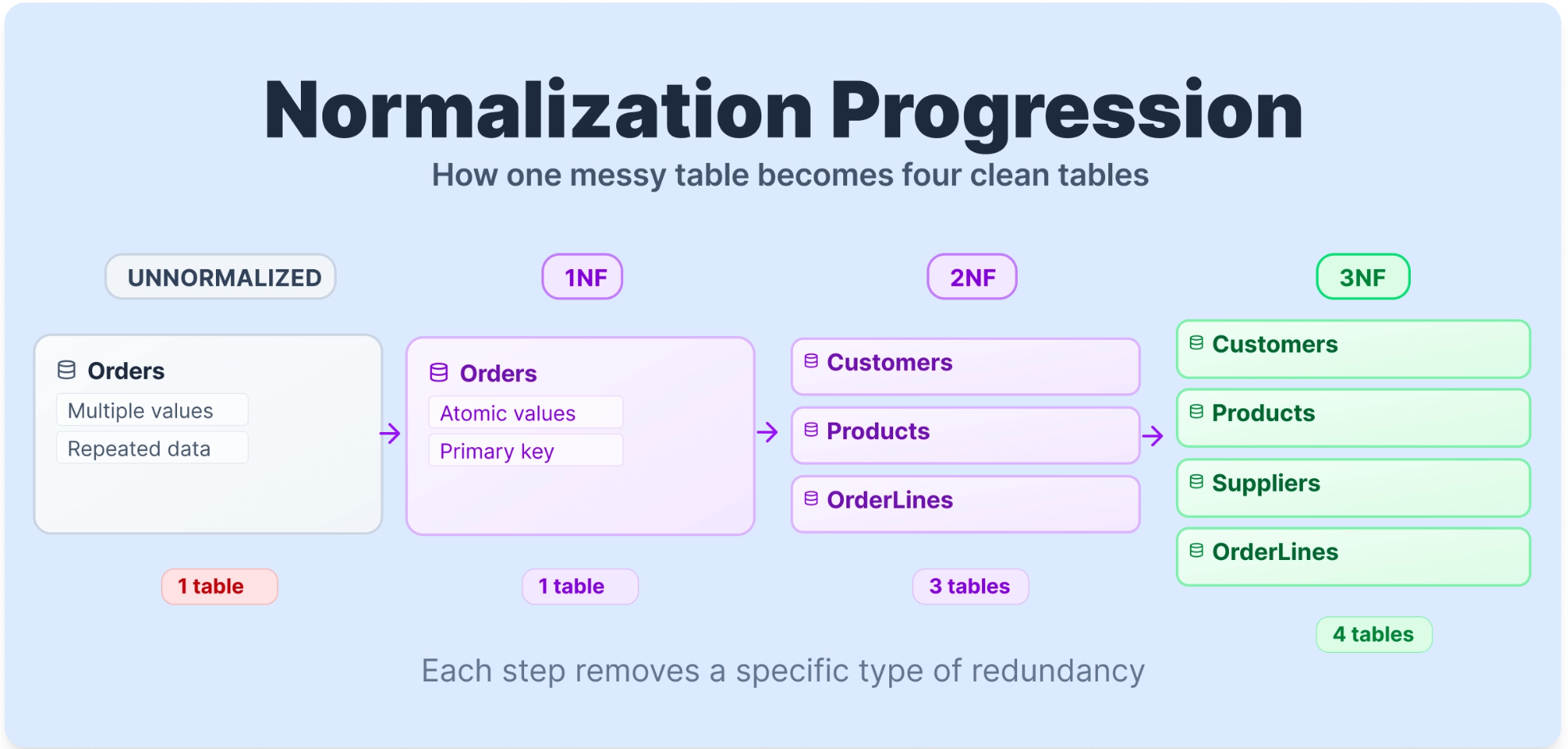
Normal forms are the stages of this process. Think of them as levels of cleanliness. A table in First Normal Form (1NF) meets a basic set of structural rules. Second Normal Form (2NF) builds on that by removing a specific type of dependency problem. Each level builds on the one before it, removing a specific category of problem that would otherwise cause headaches in both your database design and your queries.
The Dataset We'll Use
To make normalization concrete, we'll work with one table from start to finish except for BCNF, where we will apply a different table. Here's a raw Orders table, as you might find it before any normalization has been applied.
TABLE 1: Raw Orders Table (Unnormalized)
| OrderID | CustomerName | CustomerEmail | Products | ProductCategory | Quantity | SupplierName | SupplierCountry |
|---|---|---|---|---|---|---|---|
| 1001 | Sarah Johnson | sarah@email.com | Wireless Keyboard, USB Hub | Electronics | 2, 1 | TechDistrib Ltd | UK |
| 1002 | Mark Williams | mark@email.com | USB Hub | Electronics | 3 | TechDistrib Ltd | UK |
| 1003 | Sarah Johnson | sarah@email.com | Monitor Stand | Office | 1 | OfficeSupply Co | Germany |
| 1004 | Emily Davis | emily@email.com | Wireless Keyboard | Electronics | 1 | TechDistrib Ltd | UK |
| 1005 | Mark Williams | mark@email.com | Desk Lamp, Notebook | Office, Stationery | 1, 2 | OfficeSupply Co, PaperGoods Inc | Germany, France |
Several problems are immediately visible. Sarah Johnson's name and email appear twice. The Products column holds multiple values in a single cell. Order 1005 has two suppliers packed into one row. We'll fix each of these problems one normal form at a time, using this same table throughout.
To show why these problems matter in practice, let's try a query on this raw table. Say you want to count total units sold per product category.
SELECT ProductCategory, SUM(Quantity) AS total_units
FROM Orders
GROUP BY ProductCategory;
This structure makes the query unreliable and difficult to interpret correctly, because ProductCategory and Quantity both contain comma-separated lists in some rows. The database has no clean way to parse "Office, Stationery" or "1, 2" into meaningful values. The data structure is breaking the query before the logic even runs.
First Normal Form (1NF)
First Normal Form lays the structural foundation for a well-designed database. As a practical starting checklist, a table is in 1NF when it meets the following conditions.
Rule 1: Row order must not convey information.
The meaning of your data should not change if you shuffle the rows. If the sequence matters, for example, "row 1 is the primary contact, row 2 is the backup", you've embedded logic into ordering rather than into the data itself. Any information that matters should live in a column, not in a row's position.
Rule 2: Data types must not be mixed within a column.
Every value in a column should be the same type. A CustomerEmail column should hold only email strings. A Quantity column should hold only integers. Mixing types makes queries unpredictable and comparisons unreliable.
Rule 3: Every table must have a primary key.
A primary key is a column (or combination of columns) that uniquely identifies each row. Without one, you can't reliably retrieve, update, or delete a specific record. If two rows look identical, the database has no way to tell them apart.
Rule 4: Repeating groups are not permitted.
A single cell should hold exactly one value, not a list. Storing "Wireless Keyboard, USB Hub" in a Products cell is a repeating group. So is "2, 1" in a Quantity cell. When you query for all orders containing a USB Hub, the database can't filter on a comma-separated string in any reliable way.
Applying 1NF to Our Table
Our Orders table violates Rule 4 most clearly. Order 1001 has two products in one cell, and Order 1005 has two products, two categories, two quantities, and two suppliers, all packed into single cells. There is also no proper primary key.
TABLE 2: Orders Table Before 1NF (Violations Highlighted)
| OrderID | CustomerName | CustomerEmail | Products | ProductCategory | Quantity | SupplierName | SupplierCountry |
|---|---|---|---|---|---|---|---|
| 1001 | Sarah Johnson | sarah@email.com | Wireless Keyboard, USB Hub | Electronics | 2, 1 | TechDistrib Ltd | UK |
| 1005 | Mark Williams | mark@email.com | Desk Lamp, Notebook | Office, Stationery | 1, 2 | OfficeSupply Co, PaperGoods Inc | Germany, France |
To reach 1NF, we give each product its own row and introduce a proper primary key (OrderLineID).
TABLE 3: Orders Table After 1NF
| OrderLineID | OrderID | CustomerName | CustomerEmail | ProductName | ProductCategory | Quantity | SupplierName | SupplierCountry |
|---|---|---|---|---|---|---|---|---|
| 1 | 1001 | Sarah Johnson | sarah@email.com | Wireless Keyboard | Electronics | 2 | TechDistrib Ltd | UK |
| 2 | 1001 | Sarah Johnson | sarah@email.com | USB Hub | Electronics | 1 | TechDistrib Ltd | UK |
| 3 | 1002 | Mark Williams | mark@email.com | USB Hub | Electronics | 3 | TechDistrib Ltd | UK |
| 4 | 1003 | Sarah Johnson | sarah@email.com | Monitor Stand | Office | 1 | OfficeSupply Co | Germany |
| 5 | 1004 | Emily Davis | emily@email.com | Wireless Keyboard | Electronics | 1 | TechDistrib Ltd | UK |
| 6 | 1005 | Mark Williams | mark@email.com | Desk Lamp | Office | 1 | OfficeSupply Co | Germany |
| 7 | 1005 | Mark Williams | mark@email.com | Notebook | Stationery | 2 | PaperGoods Inc | France |
Each cell now holds a single value. Each row has a unique identifier. Now that the table is in 1NF, the query we tried earlier actually works:
SELECT ProductCategory, SUM(Quantity) AS total_units
FROM Orders
GROUP BY ProductCategory;| ProductCategory | total_units |
|---|---|
| Electronics | 7 |
| Office | 2 |
| Stationery | 2 |
The query returns clean, accurate results. But you'll notice Sarah Johnson's email still appears three times in the table. If she changes her email address, you'd need to update three rows, and missing even one would corrupt your data. That's what 2NF addresses.
Second Normal Form
A table is in Second Normal Form when it is already in 1NF and has no partial dependencies.
What Is a Partial Dependency?
A partial dependency occurs when a non-key column depends on only part of a composite primary key, rather than the entire key. A composite primary key is one made up of two or more columns working together to uniquely identify a row.
To see this clearly, let's think about the 1NF table using (OrderID, ProductName) as the composite key. This makes sense because a single order can contain multiple products, and knowing both the order and the product together uniquely identifies each row.
Now ask: what does CustomerName depend on? It depends only on OrderID , not on which product was ordered. The same customer placed the order regardless of what's in it. That's a partial dependency: CustomerName depends on only part of the composite key.
Similarly, ProductCategory, SupplierName, and SupplierCountry all describe the product itself, not the specific order. They depend only on ProductName, not on OrderID.
Quantity, on the other hand, depends on both: you need to know which order and which product to know how many units were ordered. That's a full dependency, and it belongs in the OrderLines table.
A useful test: if you can remove one column from your composite key and still look up a value uniquely, that value doesn't fully depend on the whole key.
Applying 2NF to Our Table
To fix partial dependencies, we split the table. Customer data moves to a Customers table. Order-level data moves to an Orders table. Product data moves to a Products table — and this is where we introduce ProductID as a cleaner identifier to replace the text-based ProductName key. The OrderLines table keeps only what depends on the full (OrderID, ProductID) key.
TABLE 4: Partial Dependencies in the 1NF Table
| Column | Depends On | Action |
|---|---|---|
| CustomerName | OrderID only | Move to Customers table |
| CustomerEmail | OrderID only | Move to Customers table |
| ProductCategory | ProductName only | Move to Products table |
| SupplierName | ProductName only | Move to Products table |
| SupplierCountry | Supplier only | Will address in 3NF |
| Quantity | Full key (OrderID + ProductName) | Stays in OrderLines |
TABLE 5: Customers Table (2NF)
| CustomerID | CustomerName | CustomerEmail |
|---|---|---|
| C01 | Sarah Johnson | sarah@email.com |
| C02 | Mark Williams | mark@email.com |
| C03 | Emily Davis | emily@email.com |
TABLE 6: Orders Table (2NF)
| OrderID | CustomerID |
|---|---|
| 1001 | C01 |
| 1002 | C02 |
| 1003 | C01 |
| 1004 | C03 |
| 1005 | C02 |
TABLE 7: Products Table (2NF)
| ProductID | ProductName | ProductCategory | SupplierName | SupplierCountry |
|---|---|---|---|---|
| P01 | Wireless Keyboard | Electronics | TechDistrib Ltd | UK |
| P02 | USB Hub | Electronics | TechDistrib Ltd | UK |
| P03 | Monitor Stand | Office | OfficeSupply Co | Germany |
| P04 | Desk Lamp | Office | OfficeSupply Co | Germany |
| P05 | Notebook | Stationery | PaperGoods Inc | France |
TABLE 8: OrderLines Table (2NF)
| OrderID | ProductID | Quantity |
|---|---|---|
| 1001 | P01 | 2 |
| 1001 | P02 | 1 |
| 1002 | P02 | 3 |
| 1003 | P03 | 1 |
| 1004 | P01 | 1 |
| 1005 | P04 | 1 |
| 1005 | P05 | 2 |
Now consider what a data analyst gains from this structure. Suppose you want to find total units ordered per customer. With the 2NF schema, this is a clean, readable join:
SELECT
    c.CustomerName,
    SUM(ol.Quantity) AS total_units_ordered
FROM OrderLines ol
JOIN Orders o ON ol.OrderID = o.OrderID
JOIN Customers c ON o.CustomerID = c.CustomerID
GROUP BY c.CustomerName
ORDER BY total_units_ordered DESC;| CustomerName | total_units_ordered |
|---|---|
| Mark Williams | 6 |
| Sarah Johnson | 4 |
| Emily Davis | 1 |
Sarah Johnson's email now lives in exactly one place. If she changes it, you update one row in Customers and every query that references her data reflects the change instantly. No missed updates, no conflicting values.
There's still a problem in the Products table, though. SupplierCountry depends on SupplierName, not directly on ProductID. That's a transitive dependency, and it's what 3NF is designed to remove.
Third Normal Form (3NF)
A table is in Third Normal Form when it is already in 2NF and has no transitive dependencies.
What Is a Transitive Dependency?
A transitive dependency happens when a non-key column depends on another non-key column rather than depending directly on the primary key.
Here's the chain in our Products table: SupplierCountry depends on SupplierName, and SupplierName depends on ProductID (the primary key). So SupplierCountry reaches the key only indirectly, through SupplierName. That indirect path is the transitive dependency.
The rule that makes this easy to remember: every non-key attribute in a table should depend on the key, the whole key, and nothing but the key.
The practical cost becomes clear when you think about updates. If TechDistrib Ltd moves its operations from the UK to Ireland, you'd need to update SupplierCountry in every row where TechDistrib appears. In a real database with thousands of products from the same supplier, that's hundreds of updates, and missing even one row means your data quietly becomes wrong.
Applying 3NF to Our Table
TABLE 9: Transitive Dependency in the Products Table
| ProductID | ProductName | ProductCategory | SupplierName | SupplierCountry |
|---|---|---|---|---|
| P01 | Wireless Keyboard | Electronics | TechDistrib Ltd | UK |
| P02 | USB Hub | Electronics | TechDistrib Ltd | UK |
| P03 | Monitor Stand | Office | OfficeSupply Co | Germany |
SupplierCountry depends on SupplierName, not on ProductID. We extract supplier information into its own table.
TABLE 10: Suppliers Table (3NF)
| SupplierID | SupplierName | SupplierCountry |
|---|---|---|
| S01 | TechDistrib Ltd | UK |
| S02 | OfficeSupply Co | Germany |
| S03 | PaperGoods Inc | France |
TABLE 11: Products Table (3NF)
| ProductID | ProductName | ProductCategory | SupplierID |
|---|---|---|---|
| P01 | Wireless Keyboard | Electronics | S01 |
| P02 | USB Hub | Electronics | S01 |
| P03 | Monitor Stand | Office | S02 |
| P04 | Desk Lamp | Office | S02 |
| P05 | Notebook | Stationery | S03 |
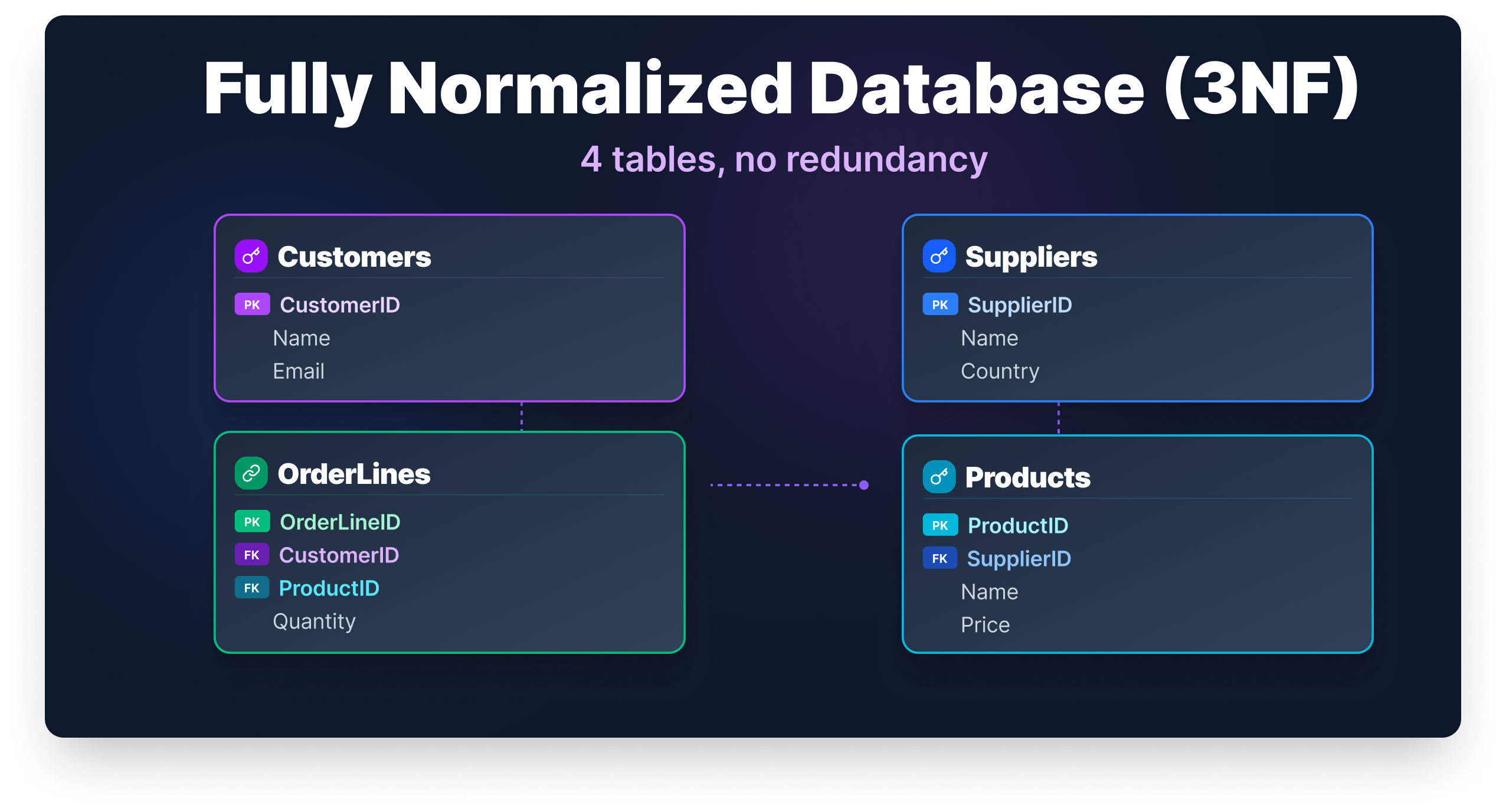
Our database now has five clean tables: Customers, Orders, Products, Suppliers, and OrderLines. Here's what an analyst query looks like against this fully normalized 3NF schema. Say the business wants to know total units sold broken down by supplier country:
SELECT
    s.SupplierCountry,
    SUM(ol.Quantity) AS total_units_sold
FROM OrderLines ol
JOIN Products p ON ol.ProductID = p.ProductID
JOIN Suppliers s ON p.SupplierID = s.SupplierID
GROUP BY s.SupplierCountry
ORDER BY total_units_sold DESC;| SupplierCountry | total_units_sold |
|---|---|
| UK | 7 |
| Germany | 2 |
| France | 2 |
This query is clean, accurate, and easy to maintain. If TechDistrib Ltd moves to Ireland, you update one row in Suppliers and this query immediately reflects the correct country. No data cleaning step needed before the analysis.
The Normalized Schema at a Glance
For reference, here's what the final 3NF schema looks like in SQL. You won't need this to follow the guide, but it shows how the relationships between tables are enforced at the database level through foreign keys.
CREATE TABLE Customers (
    CustomerID    CHAR(3)      PRIMARY KEY,
    CustomerName  VARCHAR(100) NOT NULL,
    CustomerEmail VARCHAR(100)
);

CREATE TABLE Suppliers (
    SupplierID      CHAR(3)      PRIMARY KEY,
    SupplierName    VARCHAR(100) NOT NULL,
    SupplierCountry VARCHAR(50)
);

CREATE TABLE Products (
    ProductID       CHAR(3)      PRIMARY KEY,
    ProductName     VARCHAR(100) NOT NULL,
    ProductCategory VARCHAR(50),
    SupplierID      CHAR(3) REFERENCES Suppliers(SupplierID)
);

CREATE TABLE Orders (
    OrderID    INT     PRIMARY KEY,
    CustomerID CHAR(3) REFERENCES Customers(CustomerID)
);

CREATE TABLE OrderLines (
    OrderID   INT     REFERENCES Orders(OrderID),
    ProductID CHAR(3) REFERENCES Products(ProductID),
    Quantity  INT     NOT NULL,
    PRIMARY KEY (OrderID, ProductID)
);
Each REFERENCES constraint is a foreign key. It tells the database that a value in one table must exist in another — for example, you can't add an order line for a product that isn't in the Products table. That's data integrity enforced at the schema level, not just in your application code.
[IMAGE: ER Diagram showing the five 3NF tables and their relationships]
For most real-world applications, 3NF is where you want to land. Every non-key attribute depends on the key, the whole key, and nothing but the key.
Boyce-Codd Normal Form (BCNF)
Boyce-Codd Normal Form is a stricter version of 3NF, designed to handle edge cases that 3NF doesn't fully resolve. Most tables that are in 3NF already satisfy BCNF, so in everyday work you won't often need to think about this distinction. But it's worth understanding.
The BCNF rule is: every determinant must be a candidate key. A determinant is any column that determines the value of another column. A candidate key is any column (or set of columns) that could uniquely identify a row.
The gap between 3NF and BCNF shows up when a table has multiple overlapping candidate keys. BCNF usually needs a separate edge-case example to illustrate this clearly, so we'll move to a classic course-scheduling scenario here.
Suppose a university tracks student enrollments with the following rules: each student studies each subject with exactly one teacher, and each teacher teaches only one subject (though a subject can have multiple teachers).
TABLE 12: Course Scheduling Before BCNF
| Student | Subject | Teacher |
|---|---|---|
| James Carter | SQL | Mr. Collins |
| Laura Bennett | SQL | Ms. Reed |
| James Carter | Python | Mr. Harris |
| Laura Bennett | Python | Mr. Harris |
The candidate keys here are (Student, Subject) and (Student, Teacher) — either combination uniquely identifies a row. The table is technically in 3NF, but Subject is determined by Teacher (because each teacher teaches only one subject), and Teacher alone is not a candidate key. That violates BCNF.
The fix is to separate the teacher-to-subject relationship into its own table.
TABLE 13: Teacher Subjects (BCNF)
| Teacher | Subject |
|---|---|
| Mr. Collins | SQL |
| Ms. Reed | SQL |
| Mr. Harris | Python |
TABLE 14: Student Enrollments (BCNF)
| Student | Teacher |
|---|---|
| James Carter | Mr. Collins |
| Laura Bennett | Ms. Reed |
| James Carter | Mr. Harris |
| Laura Bennett | Mr. Harris |
In practice, most well-designed 3NF databases already satisfy BCNF. The distinction matters most in databases with complex, multi-attribute candidate keys. If you're building a typical transactional system or analytical pipeline, reaching 3NF is your practical target.
Should You Always Normalize?
Normalization reduces redundancy, but it comes with a trade-off: more tables means more joins. Every time you query for a complete order, you'll join OrderLines, Orders, Customers, Products, and Suppliers. For a transactional database handling frequent inserts and updates, that's a reasonable cost. For a read-heavy analytics system, it can slow things down at scale.
This is why data warehouses often use deliberate denormalization. Schemas like the star schema keep dimension data in wider, partially denormalized tables because analysts are reading data constantly and rarely writing it. The goal shifts from protecting against update anomalies to making queries fast.
The practical guidance is to normalize during design and denormalize deliberately when performance requires it. Don't denormalize out of convenience. Do it when you have a measured reason, and document why you made the choice.
Wrapping Up
Normalization is one of those skills that feels abstract until you apply it to a real table. Watching one messy dataset transform into five clean, focused tables makes the concept click in a way that no definition alone can.
Here's the progression we covered. First Normal Form established the structural rules: atomic values, no repeating groups, a proper primary key, and no logic embedded in row order. Second Normal Form removed partial dependencies, ensuring every non-key column depends on the full composite key. Third Normal Form removed transitive dependencies, so non-key columns depend only on the key itself. Boyce-Codd Normal Form tightened those rules further for edge cases involving overlapping candidate keys.
Whether you're designing schemas or writing analytical queries, understanding normalization changes how you read a database. You'll know why a join exists, what problem it's solving, and when a query returns suspicious results because the underlying data isn't clean.
If you want to keep building on this, our SQL Fundamentals course covers querying, joins, and database design through hands-on practice with real datasets. Normalization makes much more sense once you've written queries against both messy and well-structured data, and that's exactly the kind of practice you'll get there.
FAQ
Does normalization affect query performance?
Yes, and the effect goes both ways.
Normalized tables reduce the amount of data the database has to scan when updating records, which improves write performance.
However, read queries often require joining multiple tables, which adds overhead.
For most transactional databases, the trade-off is worth it. For analytics-heavy workloads, teams sometimes denormalize selectively to reduce join complexity and speed up reporting queries.
Is normalization only relevant when designing a new database?
Not at all.
Data analysts regularly work with databases they did not design, and understanding normalization helps you interpret an unfamiliar schema faster.
When you recognize what 2NF and 3NF look like, you can quickly identify why a join exists, where a value is the source of truth, and why a query might return inconsistent results.
Normalization is as much a reading skill as it is a design skill.
What are 4NF and 5NF, and do I need to know them?
Fourth Normal Form (4NF) addresses multi-valued dependencies, where one column independently determines multiple values in another.
Fifth Normal Form (5NF) addresses join dependencies, where a table can only be reconstructed by joining three or more tables together.
Both are rare in everyday database work. For most applications, Third Normal Form (3NF) is the practical target, and BCNF covers the edge cases you are most likely to encounter.
What is the difference between a primary key and a candidate key?
A candidate key is any column or set of columns that can uniquely identify every row in a table.
A primary key is the candidate key chosen to serve as the official identifier.
A table can have multiple candidate keys but only one primary key.
This distinction matters most in BCNF, which requires that every determinant be a candidate key, not just the selected primary key.
Can a poorly normalized database cause wrong analytical results?
Yes, and this issue is often underestimated.
If the same supplier appears under slightly different names across rows (for example, "TechDistrib Ltd" versus "TechDistrib Limited"), a GROUP BY on supplier name will split that data into separate groups.
Your totals will be incorrect, and the query itself will not raise an error.
Normalization addresses this by storing the supplier name in a single location, ensuring there is only one version to query.
from Dataquest https://ift.tt/q27JQWm
via RiYo Analytics


No comments