https://ift.tt/7WXd9Hp Finding the best data analytics course is harder than it looks because data analytics covers a wide range of tools, ...
Finding the best data analytics course is harder than it looks because data analytics covers a wide range of tools, roles, and learning goals.
In this guide, we've reviewed 10 of the top data analytics courses in 2026 — from recognized beginner certificates and project-based paths to free official training for Tableau, Power BI, and Excel, and focused courses for SQL and Python. Each course is compared by cost, time commitment, format, tools taught, and best use case.
Whether you're switching careers into analytics, building skills in a specific tool your target employers use, or working toward your first portfolio projects, this guide will help you find the course that fits your goals.
Top Picks by Goal
Want the short version? Here is the best data analytics course online for each common goal:
- Best for learning by doing, with projects: Dataquest Data Analyst in Python Path
- Most recognized beginner certificate: Google Data Analytics Professional Certificate
- Best free official Power BI training: Microsoft Learn: Training for Data Analysts
- Best structured SQL path: Dataquest SQL Fundamentals Path
For the full breakdown of all 10 courses across cost, format, tools taught, and what each one actually delivers, keep reading.
Compare All 10 Data Analytics Courses
The list of online data analytics courses below has been compared across cost, time, format, tools taught, and reader fit. Course specs were checked against public provider pages at the time of publication. Regional pricing may vary.
| Course | Track | Cost | Time | Tools Taught | Best For |
|---|---|---|---|---|---|
| Dataquest Data Analyst in Python Path | Hands-On Projects | \$49/month list price; free enrollment available | 8 months at 5 hrs/week | Python, SQL, pandas, NumPy, visualization, statistics | Beginners who learn by doing, not watching |
| 365 Data Science Data Analyst Career Track | Hands-On Projects | Free plan; full access starts at \$36/month | 56 hrs | Excel, SQL, Python, pandas, NumPy, Tableau, statistics | Budget learners who want guided projects |
| Udacity Data Analyst Nanodegree | Hands-On Projects | Subscription, bundle, or one-time payment options shown at enrollment | 43 hrs | Python, pandas, NumPy, Matplotlib, Seaborn, data wrangling | Learners who want expert feedback on their projects |
| Google Data Analytics Professional Certificate | Foundations | \$49/month in the US and Canada after 7-day trial; regional pricing may vary | 6 months at 10 hrs/week | Spreadsheets, SQL, Python, Tableau, AI skills | Career changers who want a widely recognised certificate |
| IBM Data Analyst Professional Certificate | Foundations | Coursera subscription or Coursera Plus; regional pricing may vary | 4 months at 10 hrs/week | Excel, SQL, Python, IBM Cognos, Tableau | Career changers who want the widest tool coverage in one certificate |
| Tableau Free Training Videos | Specific Tools | Free | Short official video library | Tableau Cloud, Tableau Desktop, Tableau Prep basics | Anyone who wants a quick free introduction to Tableau |
| Microsoft Learn: Training for Data Analysts | Specific Tools | Free | Self-paced | Power BI, Power Query, DAX, data modeling | Analysts at organizations that use Microsoft tools, PL-300 exam prep |
| Macquarie Excel Skills for Data Analytics and Visualization | Specific Tools | Coursera subscription or Coursera Plus; regional pricing may vary | 4 weeks at 10 hrs/week | Excel, Power Query, Power Pivot, DAX, Power BI | Analysts in Excel-heavy roles who want more depth |
| Dataquest SQL Fundamentals Path | Code-First | Free intro / ~\$49/mo | ~2 mo at 5 hr/wk | SQL | Aspiring analysts learning SQL from scratch |
| DataCamp Data Analyst in Python Track | Code-First | Premium subscription; regional pricing may vary | 36 hrs across 9 courses | Python, pandas, NumPy, Seaborn, Matplotlib, statistics | Analysts who want short, interactive Python lessons |
How We Chose These Courses
The word "best" only helps if the selection criteria are clear. We prioritized courses that matched five signals:
- A current public syllabus. Fast-moving course pages change often. We favored programs with visible course counts, tools, prerequisites, and completion estimates.
- Alignment with real analyst work. A strong course should teach at least one practical workflow: SQL analysis, spreadsheet modeling, dashboarding, Python analysis, or end-to-end data cleaning.
- Hands-on practice. The best data analyst training does not stop at videos. It gives you exercises, projects, case studies, or expert-reviewed work.
- Clear fit for who should take it. A beginner certificate, a free SQL tutorial, and an intermediate Nanodegree can all be good choices, but not for the same learner.
- Honest trade-offs. We considered credential value, project depth, pricing transparency, setup friction, and whether the course is broad enough to support a real career move.
Our list of best Data Analytics courses below is organized around those signals. Hands-On Projects emphasizes visible project work. Foundations gives you broad coverage. Specific Tools goes deep on Tableau, Power BI, and Excel individually. Code-First Analytics focuses on SQL and Python for analyst roles that lean technical.
Best Hands-On Data Analytics Courses with End-to-End Projects
These are the best data analyst courses online for learners who want projects, feedback, and visible output. They focus on doing analyst work with realistic datasets rather than only watching lectures. Choose from this section if you already know the basics or want a path that focuses on project output.
1. Dataquest Data Analyst in Python Path
- Cost: \$49/month; Free plan available (limited)
- Time to Complete: 8 months at 5 hours per week.
- Level: Beginner to advanced.
- Prerequisites: None.
- Current Structure: 27 courses and 19 projects.
- What You'll Learn:
- Python fundamentals for analyst work
- SQL for querying and extracting data
- pandas and NumPy for cleaning, reshaping, and analysis
- Data visualization with Matplotlib and Seaborn
- Statistics fundamentals for analytics
- Command line, Git, APIs, and web scraping basics
- Industry Recognition: Dataquest's public path page lists more than 436,000 learners enrolled in this path.
- Best For: Hands-on learners who want to write code from the first lesson instead of watching long video lectures.
Why it works: Dataquest is built around code-as-you-learn practice in the browser, with instant feedback and guided projects. The path is coherent rather than a playlist of disconnected tutorials: you move from Python fundamentals into SQL, data cleaning, visualization, statistics, and portfolio work. The updated public path lists 19 projects, which gives learners more concrete practice than the older 6-project framing in the draft.
Worth knowing: This path focuses on Python. It is a strong fit if you want to become comfortable with code, SQL, and project-based analysis. If your target roles are spreadsheet-heavy or dashboard-heavy, pair it with Excel, Power BI, or Tableau practice. Dataquest's Junior Data Analyst and our Business Analyst path may fit better for learners who want Excel, Power BI, or Tableau first.
2. 365 Data Science Data Analyst Career Track
- Cost: Free plan available; full access starts at \$36/month.
- Time to Complete: 56 hours.
- Current Structure: 10-course career track
- Level: Beginner.
- Prerequisites: None.
- What You'll Learn:
- Excel for data analysis and reporting
- Statistics and data-driven decision-making
- SQL and relational databases
- Python programming
- pandas and NumPy for data cleaning and preprocessing
- Data visualization with Python, R, Tableau, and Excel
- Hands-on projects using real datasets
- Industry Recognition: Accredited certificate and CPE credits available.
- Best For: Budget-conscious learners who want a broad, structured path with project output.
Why it works: 365 Data Science is one of the most affordable curated paths on this list. The current curriculum is broader than the previous version: it explicitly includes Excel, SQL, Python, pandas, NumPy, statistics, visualization, and projects. That makes it a practical option for learners who want a wide analyst toolkit without paying bootcamp prices.
Worth knowing: The trade-off is name recognition on a resume. Google, IBM, Microsoft, and Tableau have stronger name recognition with hiring managers. 365 is best framed as a skill-building and project-building path rather than the most powerful resume signal on its own. If you choose it, make sure your final projects are polished enough to show publicly.
3. Udacity Data Analyst Nanodegree
- Cost: \$249/mo
- Time to Complete: 43 hours.
- Current Structure: 5 courses, 17 lessons, and 3 projects.
- Level: Intermediate.
- Prerequisites: Basic Python, basic SQL, inferential statistics, file I/O, elementary algebra, and professional English communication.
- What You'll Learn:
- The data analysis process in Python
- pandas and NumPy for exploration, cleaning, and analysis
- Advanced data wrangling
- Data visualization with Matplotlib and Seaborn
- Exploratory analysis, data limitations, and professional presentations
- Real-world projects where you choose datasets, research questions, and analysis approaches
- Industry Recognition: Udacity Nanodegree format, hands-on projects with expert feedback, personalized career coaching, interview prep, and program certificates.
- Best For: Self-directed learners who already have the basics and want expert-reviewed project work.
Why it works: Udacity's strongest advantage is not breadth. It is project feedback. You build projects, receive expert feedback, and practice communicating results in a more portfolio-oriented format than most subscription platforms. The current page also emphasizes real-world projects where learners make choices about datasets, questions, and analysis approaches.
Worth knowing: This is not a true from-zero beginner path. Udacity positions the program as intermediate and lists basic Python and basic SQL among the prerequisites. It is better pitched as a follow-on program after a beginner course, not as your first exposure to data analytics. Pricing should also be checked at enrollment because the public page does not show a stable amount.
Best Data Analytics Courses for Learning the Foundations
These two courses give you the broadest introduction to data analytics. They span SQL, plus visualization plus Excel or Python, with enough project work to help you start building a portfolio. They are best for career switchers and first-time analysts who need broad coverage before specializing.
4. Google Data Analytics Professional Certificate
- Cost: Free 7-day Coursera trial, then \$29/month
- Time to Complete: 6 months at 10 hours per week.
- Current Structure: 9-course series.
- Level: Beginner.
- Prerequisites: None.
- What You'll Learn:
- Spreadsheets for cleaning, organizing, and calculating data
- SQL fundamentals for analyst work
- Python for data analysis
- Tableau for visualization and dashboards
- The analytical process: ask, prepare, process, analyze, share, act
- Practical AI skills for data analytics
- Industry Recognition: Google brand recognition, more than 3.6 million enrollments on Coursera at verification, 150+ US employer connections, and ACE/ECTS credit recommendations.
- Best For: Beginners who want a recognized certificate with a clear analytical framework.
Why it works: Google is still one of the most recognised starting points for a new analyst. The current version is more relevant than older descriptions because it now teaches Python rather than R, while still covering spreadsheets, SQL, Tableau, and the analytical process. That makes it a broader foundations option than earlier versions that were often framed around R.
Worth knowing: This is a starting point, not a job guarantee. The certificate gives you structure and a recognizable credential, but you will still need portfolio projects, extra SQL practice, and interview preparation. The Google-versus-IBM decision is no longer "R versus Python." Both now include Python. The better distinction is that Google is stronger on name recognition with employers and process, while IBM covers more tools.
5. IBM Data Analyst Professional Certificate
- Cost: Free 7-day Coursera trial, then \$29/month
- Time to Complete: 4 months at 10 hours per week.
- Current Structure: 11-course series.
- Level: Beginner.
- Prerequisites: Basic computer literacy, high school math, and comfort with numbers are helpful.
- What You'll Learn:
- Excel for spreadsheet-based analysis
- SQL for data extraction and analysis
- Python for analysis with pandas and NumPy
- Data visualization with Tableau and IBM Cognos Analytics
- Exploratory data analysis and statistics
- APIs, web scraping, and a capstone project
- Industry Recognition: More than 540,000 enrollments at verification, IBM digital badge, and ACE/FIBAA credit recommendations.
- Best For: Career changers who want a certificate covering the most tools, with Python, Excel, SQL, Tableau, and Cognos exposure.
Why it works: IBM is the foundations option that covers the most tools. It gives learners exposure to Excel, SQL, Python, Tableau, and IBM Cognos Analytics, which can be useful in enterprise environments where analysts work across several systems. The current 11-course structure also makes the program broader than the old 8-course framing.
Worth knowing: IBM is slightly more technical and covers more tools than Google. That can be a benefit if you want breadth, but it can also feel like a lot for a true beginner. The Cognos module is useful in some enterprise settings, but less broadly requested than Power BI or Tableau. Pair this with one or two polished portfolio projects so your learning does not remain certificate-only.
Best Data Analytics Courses for Specific Tools
These three options focus on tools that appear often in analyst roles: Tableau, Power BI, and Excel. Pick based on the stack your target employers use. Microsoft-centered organizations often use Power BI. Many consulting, analytics, and data teams use Tableau. Excel remains unavoidable across finance, operations, marketing, and business roles.
6. Tableau Free Training Videos
- Cost: Free.
- Time to Complete: Short official video library. At verification, the visible library included Tableau Cloud/Server, Tableau Desktop, and Tableau Prep videos.
- Level: Beginner.
- Prerequisites: None.
- What You'll Learn:
- Getting started with Tableau Cloud/Server
- Connecting to data
- Tableau workspace basics
- Bar charts, area charts, maps, text tables, and dashboards
- Tableau Desktop basics, relationships, mapping, and calculations
- Tableau Prep basics
- Industry Recognition: Official Tableau training from Salesforce.
- Best For: Learners who want a fast, free official introduction before committing to deeper Tableau study.
Why it works: It is free, official, and quick. The videos are useful if you want to understand Tableau's interface and core vocabulary before building your first dashboard. It is also a low-friction way to test whether Tableau feels intuitive before paying for a structured course or certification prep.
Worth knowing: This is a free introductory video library, not a complete analyst course. It will not teach SQL, Excel, business framing, or a full dashboard portfolio workflow by itself. For structured project work, pair it with SQL training and a portfolio project. For deeper Tableau preparation, consider Tableau eLearning, a Tableau certification prep specialization, or Dataquest's Business Analyst with Tableau path.
7. Microsoft Learn: Training for Data Analysts
- Cost: Free.
- Time to Complete: Self-paced.
- Level: Beginner.
- Prerequisites: Basic spreadsheet or reporting experience is helpful.
- What You'll Learn:
- Data analyst responsibilities
- Data profiling, cleaning, and transformation
- Data modeling
- Visualization and reporting
- Power BI concepts
- Power Query and DAX concepts tied to the PL-300 certification path
- Industry Recognition: Official Microsoft Learn training. The related credential is Microsoft Certified: Power BI Data Analyst Associate, aligned to Exam PL-300.
- Best For: Analysts at organizations that use Microsoft tools, and anyone preparing for the PL-300 exam.
Why it works: Microsoft Learn is the cleanest free starting point for Power BI because it comes directly from Microsoft and maps to the official role and certification ecosystem. If your target employers use Microsoft 365, Azure, Fabric, or Power BI, this is the safest first stop.
Worth knowing: Microsoft-specific details do not transfer perfectly to Tableau or Looker, even though core analytics concepts do. If you want job-ready Power BI skills, use Microsoft Learn for the official path, then build at least one dashboard from a messy real dataset. For structured project work, Dataquest's Business Analyst with Power BI path is a strong portfolio-oriented complement.
8. Macquarie Excel Skills for Data Analytics and Visualization Specialization
- Cost: \$29/mo
- Time to Complete: 4 weeks at 10 hours per week.
- Current Structure: 3-course specialization.
- Level: Intermediate.
- Prerequisites: Familiarity with the Excel interface, moving around a workbook, and creating basic formulas.
- What You'll Learn:
- Excel data preparation and analysis
- Data visualization in Excel
- Interactive dashboards
- Power Query for data import and transformation
- Power Pivot and DAX for modeling
- Beginner Power BI reporting
- Industry Recognition: Macquarie University specialization and Coursera career certificate.
- Best For: Career changers in Excel-heavy roles such as finance, operations, consulting, and business analysis.
Why it works: Excel is still where a lot of business analysis happens. This specialization is useful because it treats Excel as more than a spreadsheet basics tool: the current version includes Power Query, Power Pivot, DAX, and beginner Power BI. That makes it a strong bridge for learners moving from spreadsheet work into business intelligence.
Worth knowing: This is not a full data analyst career path. It does not cover SQL or Python, and it assumes some Excel familiarity. Pair it with the Dataquest SQL Fundamentals Path below and a Power BI or Tableau project if you want broader analyst readiness.”
Best Data Analytics Courses for Code-First Analytics
These two courses serve analysts who want to move beyond dashboards into SQL and Python workflows. Dataquest covers SQL for data analysis. DataCamp covers Python analysis. Together, they can be a useful low-cost combination, but neither replaces a full multi-tool path by itself.
9. Dataquest SQL Fundamentals Path
- Cost: Free lessons available to try the platform. Full path access requires a paid plan: ~\$49/month.
- Time to Complete: ~2 months at 5 hours per week (24 hours total).
- Current Structure: 5 courses, 3 portfolio projects.
- Level: Beginner to advanced.
- Prerequisites: None.
- What You'll Learn:
- SQL basics: SELECT, WHERE, ORDER BY, filtering and sorting
- Intermediate SQL: JOINs, GROUP BY, aggregations, subqueries
- Advanced SQL: window functions, CTEs, complex multi-table queries
- Writing queries against real analyst-style datasets
- Framing business questions as SQL queries
- Industry Recognition: 52,000+ learners enrolled. Rated 4.8/5. Independently reviewed by LearnDataSci as a strong fit for hands-on, interactive learning.
- Best For: Aspiring data analysts who want structured, project-backed SQL learning rather than a self-directed tutorial.
Why it works: The Dataquest SQL Fundamentals Path is built for analysts, not software developers. Every lesson runs in your browser against real datasets from lesson one, so you write actual SQL rather than reading about it. The path goes further than most SQL courses — covering window functions and CTEs — and the three portfolio projects you’ll build will give you something concrete to show potential employers. It is a focused learning path: five courses, one skill, done properly.
Worth knowing: SQL-only by design, which is the point. For interview-style SQL practice on top of this path, StrataScratch and DataLemur are strong additions. For the full breadth of SQL options across different databases and use cases, see our Best SQL Courses guide.
10. DataCamp Data Analyst in Python Track
- Cost: \$19/mo
- Time to Complete: 36 hours.
- Current Structure: 9 courses.
- Prerequisites: None.
- What You'll Learn:
- Python for data analysis
- pandas and NumPy for data cleaning and manipulation
- Exploratory data analysis
- Data visualization with Seaborn and Matplotlib
- Joining and merging datasets
- Statistics, sampling, and hypothesis testing
- Industry Recognition: DataCamp track with certification preparation available through Premium.
- Best For: Career switchers who want Python analyst skills through interactive in-browser lessons.
Why it works: DataCamp is strong for short, interactive practice. The track is focused, beginner-friendly, and designed around Python analysis rather than long lectures. The current public page makes the positioning clear: this is a Python-focused path for cleaning, manipulating, visualizing, and analyzing data.
Worth knowing: The current Data Analyst in Python track should not be described as a combined SQL-and-Python analyst path. SQL appears elsewhere in DataCamp's catalog, but this specific track is focused on Python, pandas, NumPy, visualization, and statistics. If SQL is your main gap, start with Dataquest SQL Fundamentals or another dedicated SQL track instead.
When You Actually Need a Data Analytics Course
You need a structured course when you are new to the field, switching careers, or facing a comprehensive skill gap across multiple tools.
The signs you will benefit from a course, not just docs, YouTube tutorials, and Stack Overflow:
- You are a complete beginner. Without foundations, individual tutorials do not compose into a coherent skillset. A structured course builds the mental model that connects SQL, Excel, visualization tools, Python, and statistics.
- You are switching from a non-analytical role. A certificate from Google, IBM, Microsoft, or another recognized provider can help show intentional career change when you do not yet have analyst work experience.
- You need to learn multiple tools at once. Excel plus SQL plus a visualization tool is a common analyst minimum. A structured course helps you sequence those skills instead of bouncing between random tutorials.
- You want accountability and feedback. Courses with projects, deadlines, or expert review can be more effective than a free playlist if you struggle to finish self-directed learning.
- You are targeting employers who filter by certificates. Some industries and organizations still value recognizable certificates, especially for entry-level applicants.
What Should You Look for in a Data Analytics Course?
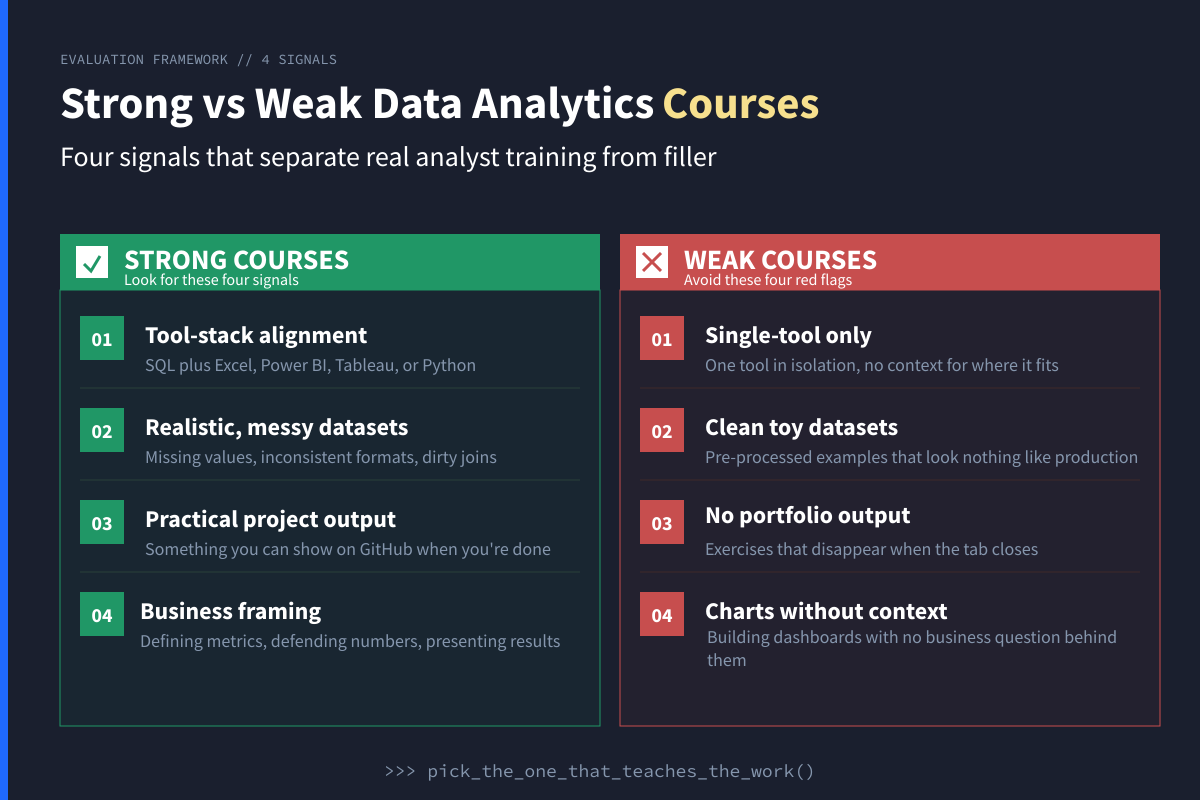
Data analytics is harder to teach than most adjacent fields because the work is so spread across many tools. A good analyst writes SQL, builds dashboards in Power BI or Tableau, models in Excel, sometimes writes Python, and, most importantly, translates messy business questions into defensible numbers. Most courses cover one or two of those pieces and leave you with gaps your future team will notice in week one.
Four signals tell strong data analytics courses from weak ones:
- Tool-stack alignment with real analyst roles. A practical course covers SQL plus at least one of Excel, Power BI, Tableau, or Python. Courses that teach only one tool can still be useful, but they should be positioned as tool training, not a complete career path.
- Realistic datasets and messy workflows. Look for missing values, inconsistent formats, dirty joins, business definitions, and project prompts that require judgment. Toy datasets teach syntax. Messy datasets teach analysis.
- Business framing, not just technical mechanics. A good course teaches you to define metrics, ask clarifying questions, explain assumptions, and present recommendations. Working analysts do not just build charts. They help teams make decisions.
- Modern stack alignment. Today's analyst roles commonly involve SQL, Excel, Power BI, Tableau, Looker, Python, or some combination of those tools. Be careful with courses that feel dated, tool-isolated, or disconnected from the way teams actually work.
When You Should Skip the Course
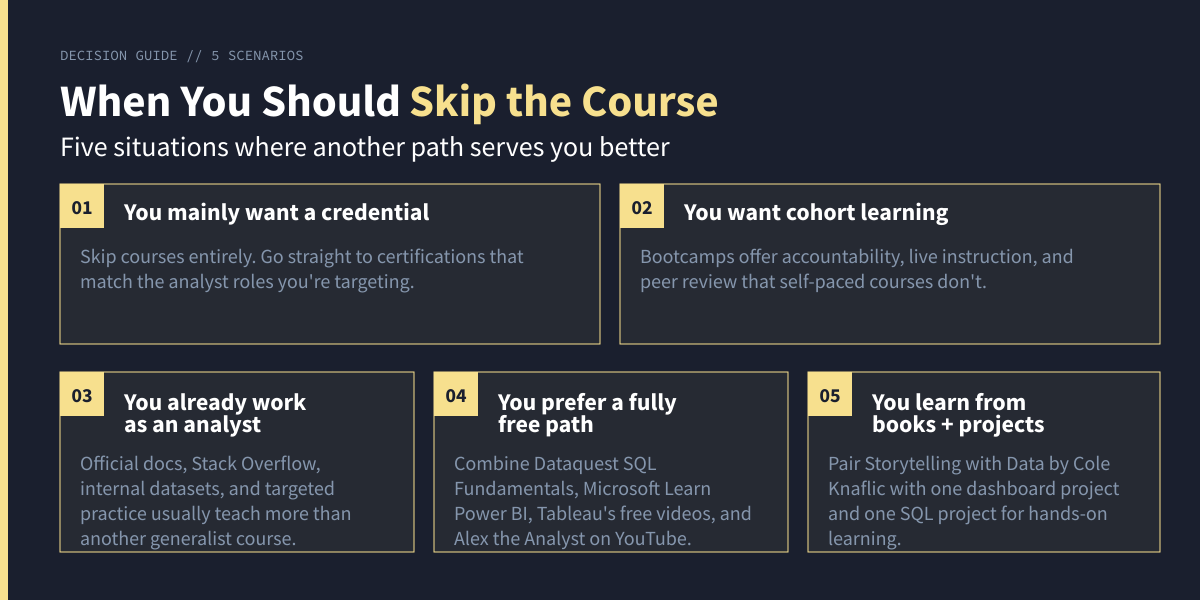
You can probably skip a course-based path if you fit one of the five scenarios in the diagram above. Details and next steps for each:
- See our Best Data Analytics Certifications guide for credentials worth considering.
- See our Best Data Analytics Bootcamps guide for immersive cohort-based options.
- Working analysts often get more from official docs, internal datasets, Stack Overflow, and targeted practice than from another generalist course.
- Combine the Dataquest SQL Fundamentals Path free intro lessons for SQL, Microsoft Learn for Power BI, Tableau's free videos, Alex the Analyst on YouTube, and ExcelIsFun for Excel depth.
- Storytelling with Data by Cole Nussbaumer Knaflic remains a useful book on analyst-style data visualization. Pair it with one dashboard project and one SQL project for stronger learning than passive reading alone.
Making Your Data Analytics Course Decision
The best data analytics course is the one that matches the tools your target employers use and the format that fits how you learn. Pick based on the tools your target companies actually use, not whichever platform has the biggest brand.
If you do not yet have a target stack, start with broad foundations. The Dataquest Data Analyst in Python Path is a strong hands-on choice, while the Google Data Analytics Certificate is the strongest and most recognized beginner certificate. Once you start reviewing job descriptions and interviewing, you will learn what tools matter most in your target industry.
If you already have a target stack, skip the generalist course and go straight to the tool you need. Microsoft-centered organizations often want Power BI plus SQL plus Excel. Tableau-heavy teams often want Tableau plus SQL plus Python or Excel. Finance and operations roles often lean heavily on Excel plus SQL plus one visualization tool.
Want a path-by-path recommendation?
- Complete beginner who wants to learn by doing: Dataquest Data Analyst in Python Path.
- Career switcher targeting a recognizable beginner credential: Google Data Analytics Professional Certificate.
- Career switcher who wants a broader tool mix: IBM Data Analyst Professional Certificate.
- Budget-conscious learner who wants a structured project path: 365 Data Science Data Analyst Career Track.
- Learner with basics who wants expert-reviewed projects: Udacity Data Analyst Nanodegree.
- Learner in an Excel-heavy role: Macquarie Excel Skills for Data Analytics and Visualization.
- Power BI learner: Microsoft Learn: Training for Data Analysts.
- SQL learner: Dataquest SQL Fundamentals Path.
- Learner who wants to start with Python: DataCamp Data Analyst in Python Track.
- Still researching the field and skills: Start with our How to Learn Data Analytics guide before picking a course.
Pick one. Block study time on your calendar. Finish it before enrolling in another. Then build something real that you can show employers. You will learn data analytics faster by solving real problems than by collecting more courses.
Frequently Asked Questions
Are data analytics courses worth it?
For most career changers, yes. A structured course gives you the mental model that connects SQL, Excel, data visualization tools, Python, and statistics in a way disconnected tutorials often do not. A recognized certificate can also help signal that you are making an intentional career move.
For working analysts, general courses are less useful. At that stage, you will usually learn faster from official tool docs, real work datasets, peer review, and targeted practice. The exception is learning a new tool from scratch, such as moving from Tableau to Power BI.
What's the difference between a data analyst, business analyst, and data scientist?
A data analyst answers business questions using existing data, typically with SQL, Excel, and a data visualization tool. A business analyst focuses more on processes, requirements, workflows, and stakeholder alignment, though many business analyst roles still use data heavily. A data scientist usually works more with statistical modeling, machine learning, experimentation, and Python or R.
The boundaries blur in practice. Read the job description, not just the title. If the role asks for SQL, Excel, dashboards, and business reporting, it is usually an analyst role. If it asks for machine learning, predictive modeling, and experiment design, it is closer to data science. For data science learning paths, see our Best Data Science Courses Catalog.
How long does it take to become a data analyst?
A realistic timeline is 6 to 12 months at 10 to 15 hours per week of focused study, including portfolio work. It can be faster if you already know SQL, Excel, or Python, and slower if you are starting from zero.
Job-ready means more than finishing a course. Aim for 3 to 5 projects you can explain clearly: an SQL analysis with business framing, a dashboard in Tableau or Power BI, an Excel analysis or model, and ideally one Python analysis if your target roles mention Python.
Should I take the Google or IBM Data Analytics Certificate?
Both are strong beginner options, and both now include Python. The old shortcut of "Google for R, IBM for Python" is outdated.
Choose Google if you want the most recognized beginner certificate and a clear analytical process. Choose IBM if you want a certificate that covers more tools, including Excel, SQL, Python, Tableau, and IBM Cognos Analytics. Either way, the certificate alone will not get you hired. Pair it with portfolio projects and extra SQL practice.
Should I learn Power BI or Tableau?
Pick based on your target employers. Power BI is common in Microsoft-centered organizations. Tableau is common across many analytics, consulting, and data teams. Neither is universally better.
Once you know one dashboarding tool well, the second is much easier. The concepts transfer: data models, calculated fields, filters, dashboards, and storytelling. For your first year, go deep on one tool instead of shallowly learning both.
Can I learn data analytics for free?
Yes, but you will need more structure and discipline. A strong free path can combine the Dataquest SQL Fundamentals Path (free intro lessons) for SQL, Microsoft Learn for Power BI, Tableau's free training videos for Tableau orientation, Alex the Analyst for practical walkthroughs, and ExcelIsFun for spreadsheet depth (the channel has a catalogue of 3,900+ Excel tutorials remains free to access).
What paid courses add is structure: a sequenced curriculum, feedback, projects, assessments, reminders, and sometimes a recognized certificate. Free resources can teach the skills, but you have to build the roadmap yourself.
Do I need to learn Python for data analytics?
Not always for entry-level analyst roles. The minimum analyst stack is often SQL plus Excel plus a visualization tool. Many analysts do useful work for years without writing Python every day.
Python becomes more important for analyst roles that involve automation, larger datasets, experimentation, analytics engineering, or data-science-adjacent work. If your target job descriptions mention Python often, learn it early. If they emphasize Excel, Power BI, and SQL, start there and add Python later.
What's the best way to learn data analytics if I'm self-taught?
Start with SQL because it is broadly useful across analyst roles. Then add Excel or a visualization tool based on the roles you want. Once you can query data, clean it, and present it clearly, add Python if your target roles require it.
Build three to five portfolio projects using [real datasets](https://ift.tt/AXscCrB). Real datasets means Kaggle, BigQuery public datasets, local government open data, or a dataset from work. Pre-cleaned toy datasets are useful for syntax, but messy datasets teach the judgment you need on the job. Apply before you feel fully ready, then use interview feedback to find your next skill gap.
from Dataquest https://ift.tt/VT9xich
via RiYo Analytics


No comments